Showing posts with label Facebook Tips. Show all posts

Saturday, 26 April 2014

Tips For Increase Facebook Page Like 2014

By With No comments:
Now a days Social media play good role in the internet world, and everybody will use Social site like Facebook, Twitter, Google Plus for different different propose, but today here we explain you about Increase Facebook like, but how to increase Facebook like, every  fb page manager want that how their page like increase , so today here i will going to explain you some good tips to increase Facebook page like 2014.


increase+facebook+likes

Saturday, 1 March 2014

Steps To Fake Your Facebook Location

By With No comments:
Facebook Users are growing day by day. The use of Social Networking Site for personal and Business Purposes, and lot's more now-a-days. All have their own account in social networking site, and mostly in Facebook and twitter. They also use this Social Networking sites for Share their product, their brands and lot's more.In Such time, May be Business person or any other person and they do not want to display their own location means they do not want showing their real location to users, but they want showing  their fake Facebook location to users. In that case , there is one awesome tip that will make your Facebook Location Fake and In Facebook map showing wrong location.


Fake+Facebook+Location


So Follow Below Steps To Hide our Location From Other In Facebook.

1)A Mozilla Firefox Add-on, 
>Go for Mozilla Firefox Add-ON and Download Geolocater.

>Run Geolocator and then after add a New Fake location , What Location you want to add you can add that location.

2)you also download User Agent Switcher add-on from Firefox ADD-ON. 

>Run this add-on from the Tools menu Which will also works for smartphones and iPhone.

3)Now login in to https://touch.facebook.com/ and check In. A popup menu asking you to select your proper location that you have created and select that option and finish the steps. just follow this much step and you done.

So this are steps for create Fake Location Facebook, with the help of above Facebook tips you can create Fake Facebook Location and Hide your Location From User.

Monday, 10 February 2014

How To Create Creative Facebook Timeline Covers

By With No comments:
Now Facebook is changing now a days how we can express ourselves on Facebook page and page "Timeline cover". how to create creative Facebook timeline covers Page on your Facebook Page, because People are crazy and also they love creative pic Timeline cover.


Facebook+Timeline+Cover


In Reality there are multiple ways to make photo creative for Facebook Timeline, if you are designer then don't need to find tool to make your cover photo creative, you can do it you yourself but today i show you some best creative ways to create your Facebook timeline cover photo awesome.For other, People who might some have Photoshop Skills, So for that type of people i also show you some some free tools that will help you to make timeline cover creative. 

ways to make photo creative for Facebook


>Choose 851px x 315px canvas .
>In the cover photo you need to Show the user observing the “action”.
>Create a continuation of the cover photo
>Simply complement the cover image.
>Extend the theme of the profile pic.
>For the profile and cover photos Provide “meta” commentary.

Now we see some example! What other Have Already done, throw that you can get some Idea.

Giuseppe Draicchio awesome and beautiful cover.

make your creative cover photo

>Fabio Maravilla great mirror effects cover.

make your creative cover photo

>hughbriss  use his cover for two propose first say himself  and second promote his business.

make your creative cover photo

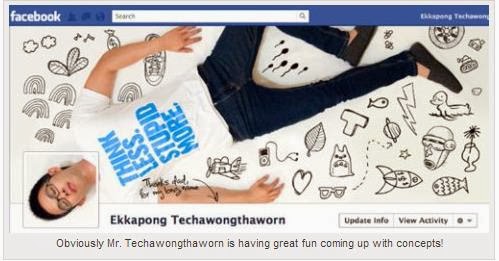
>Ekkapong Techawongthaworn create some great cover that are all in posted on his Google+profile. 

make my cover photo creative

make my cover photo creative

Now you get some idea how to make your cover photo creative, and also following tools will help you to make awesome Facebook Cover.

1)Face It Pages 

Faceitpages+fb+cover
faceitpages tool is best tool to make my cover photo creative.you need to create custom landing tabs for your Facebook Business page or Fan page.you can add 20 plus application to your Facebook business page. 

2)Timeline Cover Banner

Timelinecoverbanner
Timeline Cover will help you to Creating awesome Facebook Timeline Cover For Fun.it's also allows you to advertisement free covers. 

3)My FB Covers

My FB Cover

My FB Cover make your Facebook profile unique.and also create high quality FB Cover. 

4)Pic Scatter 

Pic Scatter

Pic Scatter you need to upload Fb account photos to create a custom timeline cover. Pic Scatter will provide gray scale effect for free, while other will be premium. 

5)Cover Junction

Cover Junction

Cover Junction will help you to make unique FB Cover.it's best tools to make my cover photo creative.

Friends This are the tools and step will help you to make your Facebook Timeline Cover awesome and Beautiful. 

Thursday, 2 January 2014

Invite All of your Facebook Friend at Once to Like your Facebook Page By Single Click [New Code]

By With 12 comments:
Here I Explain you Best Tricks is Useful to all Facebook users.how to invite all your Friends to like your fb page by single click, I explain new method.

Facebook+Invite+Friends+Page+Like

Step 1 : Go to Your Facebook page or Open that page for which you Like to invite your fb Friends.

Step 2: Now click On SEE ALL to invite all friends.

Invite All of your Facebook Friend at Once to Like your Facebook Page By Single Click [New Code]


Step  3 : Now you see the one window will open.you have to scroll down on your friend list until you reach the bottom, it will take time one minute or two minutes as per your friends more friends then one more minutes ...

Invite All of your Facebook Friend at Once to Like your Facebook Page By Single Click [New Code]

Step 4:  Once you reach at bottom your friend list , Then press CTRL+SHIFT+J or press F12 and click on console.

Fb+Page+Invite

Step 5: Now Paste Below Code in Console and then Press Enter.

javascript:var inputs = document.getElementsByClassName('uiButton _1sm');
for(var i=0; i inputs[i].click();
}
  

Step 6: Now Process Will Start it take some time after end of process you see that All Facebook Friend Invitation send  .

Note:- If you are using Firefox and hit go instead of hitting enter the code will not work!

If you Have any Problem Regarding this Invite All of your Facebook Friend at Once to Like your Facebook Page By Single Click [New Code] then you can comment Below.

Sunday, 29 September 2013

Latest Facebook Tips and Tricks 2013

By With 13 comments:
Facebook is the most widely used social network these days. It allows people to share news, updates and life events with their friends and family.Facebook is the Right Platform to Make new friends and Increase your Friend Circle by Chatting with Your Friends , Sharing Pictures or Videos,Tagging Your Friends in Your Photos etc and Much More.If you are a regular Facebook user then I am sure you will be aware of Facebook normal features like Add/Delete Friends, upload photos, status etc. How about learning something new about Facebook ? That’s why I am going to share some amazing Facebook Tips today.

Latest Facebook Tips and Tricks 2013
       

(1)Remove/Disable Facebook Seen Option in Chat

Facebook has recently Included all new Seen Option in Facebook Chat that allows Users to Know whether the Message You have Sent to Your Friends is Seen by Your Friend or Not.Though it is a Very Good Feature but it creates Problem for You When You Don’t want to Reply to Your Friend or Want to Ignore his Messages since because of this Seen Option your Friend will easily Know that You are Ignoring his Messages.

   
Latest Facebook Tips and Tricks 2013
                                                    
To Disable Facebook Seen Option in Chat You Just Need to Download an Unseen Extension For Your Web browser and it will Completely Disable the Seen Option in Your Facebook Chat.

Google Chrome : Download Facebook Unseen – Download Link

Mozilla Firefox : Download Facebook Unseen  – Download Link

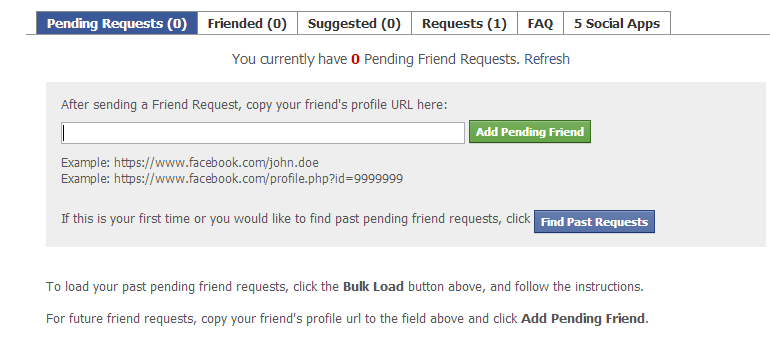
(2)Track Pending Friends Requests on Facebook


fbtricks


Using a Facebook friend requests application, you can easily track all your pending friend requests on Facebook. So, you will be able to see who has not accepted your friend request. You will also get list of friend suggestions using that application.

(3)Remove Facebook Advertisements and  Customize Facebook colors and fonts


facebook Tips ans Tricks


By Using Fabulous extension for Google chrome, you can disable Facebook advertisements and enjoy cleaner Facebook look and you can Customize background colors of Facebook website and add custom background images, change font size and styles etc..

(4)Turn Off Chat for Some Friends


facebook tips and tricks


I think all of know this tricks .How to Turn on chat for only some Friends.You can show online status to selective friends using advanced chat settings on Facebook. You can Turn off chat for some friends or become visible for selective friends using advanced Facebook chat settings.

(5)Zoom Facebook Photos without Opening Them


Most of people Not seen the prefect image because image size will very small with the use of the this tricks you can seen the whole image in a zoomed view. You Can full zoomed view of any photo on Facebook regardless of its privacy settings and without clicking on it using Photo Zoom extension for Facebook.

(6)Get Status Update notifications from Favorite Pages


latest facebook Tips


You can now subscribe to updates of your favorite Facebook pages and easily get notified as they update their Facebook page status. In order to do this, move your mouse over the page like button and click on get notifications.


(7)How to Send Friend Requests When Blocked


facebook Tips and Tricks 2013


Sometimes Facebook block accounts for sending massive friend requests to unknown persons. After getting blocked, you will not be able to send friend requests on Facebook even to people you personally know. Here is a cool Facebook trick that will allow you to send friend requests to people even if you are blocked.


Then Login to Facebook account and get the email address of the person you want to add to as a friend. Then click here and you will be able to add friends by using different email services. Login with any of those email services and add your required contacts to Facebook.


(8)Check Who Is Online and pretending to be Offline


latest facebook Tips


Sometimes people disable Facebook chat and pretend as if they are not using Facebook. Now you can easily detect which friend is using Facebook secretly while keeping Facebook Chat offline. Online Now application for Facebook allows you to track hidden online friends easily.

(9) Login to Multiple Facebook account at a Time


fb Tips and Tricks


By using Google chrome Browser, you can Login to multiple Facebook accounts at a time. Open Google chrome and Login to your Facebook account. Then click the settings tab and add a new user to chrome browser. It will open a new chrome window where you can login to other Facebook account.Now, you will be able to use and manage both accounts using the two chrome windows. In the similar manner, you can access as many Facebook accounts as you like using Google chrome.

(10)Change Facebook Themes


new Facebook tips


We All Know very well Facebook default theme color is blue .How about changing the colors and whole look of Facebook website for a cooler look? Here i have another tricks to change the facebook themes. Hundreds of different different stylish Facebook themes are available with a Google chrome/Mozilla Firefox extension named Facebook themes. You can also create your own custom theme for Facebook and access other themes at fbskins.

(11) Watch Live TV on Facebook


When I listened about Watching Live TV on Facebook I was Totally shocked and Amazed for a Moment But Yeah You can Really Watch Live International TV Channels Streaming in Your Facebook Without any Cost which means it is Totally Free of Cost.You Can Even Watch Your Favorite Sports or Olympics Here.

Watch Live Streaming TV on Facebook:  visit here

(12)Find Who UnFriends you on Facebook


facebook Tricks

If any of Your Friend unfriend U then u don't know who will unfriend you but using unfriend alerts application for Facebook, you can get notifications whenever any of your friends removes you from his/her friend list.

(13)How to Add Dislike Button to Facebook


Latest Facebook Tips and Tricks 2013


Facebook allows people to like their favorite stuff but you can’t dislike things that you hate. but some time you Don't like Some thing that time you think How I dislike this post or image or etc.Facebook has not introduced dislike button till now. But you can still have dislike button along with like button for all stuff on Facebook.


so friends now you know this all the tricks very well.tell me which Facebook tips you like the most and also share this tricks to your friends . Till that Time happy surfing .

Saturday, 24 August 2013

How To Add Facebook Page Like Box to Blogger Blog

By With 2 comments:
                     
Facebook Like Box
                      

Now-a-days social media have a great impact on Search Engine Optimization. Most of the Search Engines analyze how a website is popular to social media. Facebook is one of the most popular social media and this social media is very common to all. You can get tons of traffic from Facebook. Facebook has about 1.06 billions of monthly active users and it is increasing day-by-day. Now can you imagine how it is important for your website’s traffic.